Only in America are CDMA devices very popular which says a lot as CDMA is constantly ageing. GSM devices have ruled over seas and in domestic areas the best thing about GSM is you can put in a SIM card and continue using your service. However doing that can cause certain features such as HSPA or LTE to not work and as a result the device can be useful or useless.
GSM based devices use HSPA,UMTS,EDGE,GPRS or LTE the huge advantage that GSM has over CDMA is the universal ability to change service providers however some carriers may choose to "lock" their devices to keep it on their network however you can "unlock" by entering an unlock code. Airwaves provide the way for wireless devices to communicate and different frequencies like 850MHZ can talk to 1900MHZ. With that being said you will want to check your device's frequencies and the carrier you want to switch to frequencies as having all frequencies but one can result in having only EDGE. That is the thing that people don't seem to give Apple credit for as the iPad and iPhone have LTE and GSM and CDMA radios and don't disappoint on performance unless it is a bad radio or network if you have Sprint. I personally recommend a world phone that can be unlocked for another network like O2 so if you come to the U.K for example your AT&T phone will use O2 and vise versa. Another thing people don't seem to credit Apple for making a dual CDMA and GSM radio so if you have Verizon or Sprint or any other CDMA carrier you can use a GSM carrier for back up or just left Sprint.
Showing posts with label lawsuit. Show all posts
Showing posts with label lawsuit. Show all posts
Tuesday, December 11, 2012

Tuesday, December 4, 2012
How to use a shared PC
As for some of those times when all you have brought with you is just your smart phone and you need access to a PC. In every techies mind using a public computer can feel as disgusting as a port-a-potty not like dirt everywhere but cluttered with malware, someone not logging out of their email or the most popular someone downloading useless programs and toolbars. In this post I want to show you what to do you avoid those problems and potential risks of your account being taken.
1. Use safe mode as it does not run excess programs like tool bars so if you know that the PC is free but is bloated give safe mode a try. However the downside to safe mode is that fine tuned malware can still run or block other programs. To get into safe mode on a Windows PC after the bios has loaded press F8 repeatedly then press enter on safe mode with networking.
2. Use a virtual environment this is one of the most secure methods of using another PC however if you are using another user account which does not allow executable files this method is useless. One program to use to prevent potential malware is Sandboxie as it runs programs and files in a virtual environment. You should use this method if you are doing potential risky things to prevent the spread onto other computers and prebvent man in the middle attacks
3. Boot from something other than the boot drive like a DVD or USB drive. Certain Linux distros allow you to boot and try the operating system directly from the drive without even touching another drive. You will want to keep in mind as public computers can have a policy to prevent users from doing this as thus has been said consider your self warned.
1. Use safe mode as it does not run excess programs like tool bars so if you know that the PC is free but is bloated give safe mode a try. However the downside to safe mode is that fine tuned malware can still run or block other programs. To get into safe mode on a Windows PC after the bios has loaded press F8 repeatedly then press enter on safe mode with networking.
2. Use a virtual environment this is one of the most secure methods of using another PC however if you are using another user account which does not allow executable files this method is useless. One program to use to prevent potential malware is Sandboxie as it runs programs and files in a virtual environment. You should use this method if you are doing potential risky things to prevent the spread onto other computers and prebvent man in the middle attacks
3. Boot from something other than the boot drive like a DVD or USB drive. Certain Linux distros allow you to boot and try the operating system directly from the drive without even touching another drive. You will want to keep in mind as public computers can have a policy to prevent users from doing this as thus has been said consider your self warned.
Monday, October 29, 2012
Norton irritates user
This is a follow up on a small article
I felt it was interesting because the popular software company
Symantec sued as a scareware seller. The article can be found in
Maximum PC magazine the March 2011 issue.
A man claims that Norton
Utilities said made his PC full of privacy issue and continued to
display them while he was using his PC. Also as a PC user I feel that
Norton constantly aggravated me for multiple things how when it would
constantly bug me about potential malware on my PC that didn't exist
and the fact that unistalling the software completely requires me to
download their own program to completely “remove” their program
and before removing the program it literally want to to enter a code
to verify which bugs me and makes me wonder about the numerous IT
professionals having to maintenance hundereds of computers and having
to enter a code for every single would become very time consuming.
The man states that Symantec
uses these warnings to trick their users to purchase licences for
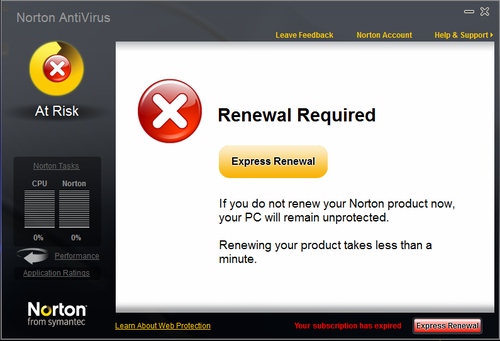
their products. With Symantec's popular Norton AntiVirus when a trial
is activated the program constantly harasses it's users to upgrade
their license and if you wait you are hit with a annoyance every hour
it minimizes full screen applications and makes the user want to quit
using their computer completely until the program is fully unistalled
which requires another Symantec program which users don't know if it
putting more registry keys onto the computer.


Subscribe to:
Posts (Atom)